
Changing ERP? How to Keep Reporting and Forecasting Running
By Tim Bryden
Moving to a new ERP is a significant investment. Whether the move is from Microsoft Dynamics GP or NAV to Dynamics 365 Finance & Operations, from Xero to NetSuite, or between other finance systems, the business needs to focus on getting the new system right.
At the same time, Finance still needs to report results, update forecasts, manage cash and answer questions. Historical information needs to remain accessible, and budgets prepared under the old account structure still need to be compared with actuals from the new system.
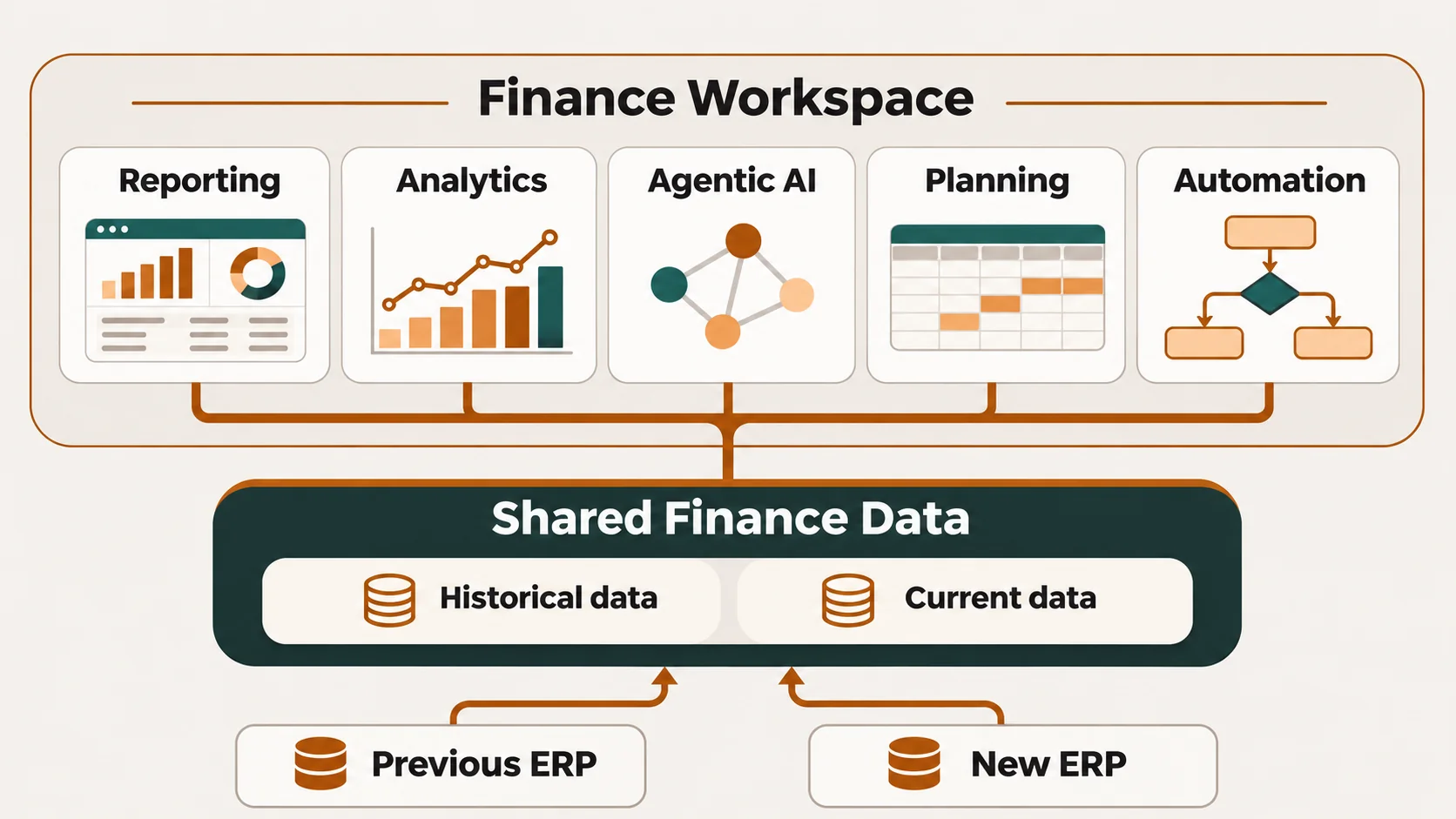
A flexible reporting and planning environment can help manage this transition. It can preserve the old data and reports, connect to the new ERP, and adapt as the business settles into new ways of working.
An ERP change is also a good time to look closely at existing reporting, planning and automation. Some processes should carry forward. Others may have been workarounds for limitations that no longer exist.
Understand which accounts and dimensions are changing
An ERP migration typically introduces a new account structure and may change how departments, cost centres, products, projects and other dimensions are recorded.
However, not everything changes.
The company hierarchy may remain largely the same. Products, properties and projects may retain their existing identities. Management may still want to review the business using familiar divisions and reporting groups.
It is worth understanding these distinctions before rebuilding the reporting model. Where an existing dimension still serves the business and can sensibly be retained, keeping it can simplify the transition and preserve useful comparisons.
Where structures do change, Finance needs to agree how historical actuals, existing budgets and forecasts will map to the new reporting requirements. A new account code does not necessarily mean a new management reporting line, but the relationship needs to be understood and checked.
Keep the old data and reports available
Our usual approach at Brydens BI is to retain all the data from the old ERP, together with its original dimensions and relevant reporting structures.
We make clearly named copies of the relevant tables, views, reports and other objects. For example, we use a GP suffix for a Microsoft Dynamics GP environment or NV for NAV.
The naming is simple, but useful. Users can recognise the old environment, open familiar reports and see historical results as they previously saw them. They can investigate a balance or compare reporting without first having to understand every change introduced by the new ERP.
This also means historical detail can remain available in the reporting environment without all of it having to be loaded into the new ERP. The scope of the ERP migration and the arrangements for historical access should be agreed together.
Over time, the older reports can be made less prominent or archived as users become comfortable with the new environment. Everyday reporting can then focus on the current business and future plans, while historical information remains accessible when needed.
Prepare the historical environment before cutover
There is no need to wait until the old ERP is switched off before preparing this environment.
We can copy the data, dimensions and reporting objects while the existing system is still operating. Finance can then review the reports, check the detail and become comfortable with how historical information will be accessed.
The important requirement is an easy, repeatable refresh process. Once the final transactions and adjustments have been completed in the old system, the historical environment can be refreshed to capture that final position.
We have used this approach for Standards Australia’s Microsoft Dynamics GP environment, Salta Properties’ NAV environment and numerous Xero instances for Zip Money.
Preparing it early gives Finance one less issue to resolve during cutover. It also provides a familiar reference point when checking the new reporting.
Adapt reporting as the new ERP takes shape
During implementation, account structures, dimensions and processes can continue to develop. Reporting requirements often become clearer as users start working with the new system.
Our position has always been that we support the ERP implementation. The business needs to concentrate on getting the ERP right and gaining value from its investment.
Because the solutions we recommend are flexible, we can move quickly and adapt reports, forecasts, calculations and other models to suit the new environment. That might mean changing an integration, revising a hierarchy, updating an allocation or adjusting how a forecast uses project information.
This still requires planning and reconciliation. But it gives the business room to make sensible decisions about the new ERP without every existing report becoming a constraint.
Several of our clients illustrate how reporting environments can adapt:
- Salta Properties moved from NAV to D365 F&O, and we were able to retain and enhance its reporting and planning environment across complex consolidations, property, development and treasury.
- Standards Australia moved from Microsoft Dynamics GP to D365 F&O. Its environment now integrates with D365 F&O, Employment Hero and its internal data warehouse.
- Zip Money moved from multiple Xero and other general ledger environments to NetSuite. Its reporting and planning environment adapted to the new source system while retaining access to historical information.
- Geocon’s reporting environment has evolved as its underlying systems changed. It brings together D365 F&O general ledger and project information, Salesforce and Employment Hero.
The circumstances differ, but each example involves reporting that needs to work across more than one system and remain useful as the business changes.
Keep budgets and forecasts comparable
Budgets and forecasts often span the migration date. A budget may have been prepared using the old account structure, while actuals begin arriving under the new one.
Finance needs a consistent basis for comparison.
That means deciding how existing plans map to the new accounts and dimensions, retaining approved versions and checking that actual-versus-budget reporting remains meaningful. Where a business has restructured, it may also need both the original approved view and a revised management view.
The same attention is needed for forecasts linked to workforce, project, CRM or operational data. Those connections may need to change even when the main forecasting assumptions remain valid.
A reporting and planning environment that can hold both old and new structures gives Finance more options for managing these comparisons.
Review what reporting and planning should do better
An ERP migration is a good opportunity to challenge the processes that have accumulated around the old system.
Which reports are still used? Which spreadsheets exist because data was difficult to extract? Which reconciliations, allocations or adjustments are repeated manually? Does the forecasting process reflect how the business now operates?
For clients moving to D365 F&O, NetSuite, Sage Intacct or other systems we work with, there is an opportunity to take fuller advantage of the new ERP through connected reporting, analysis and planning.
That could include:
- Consolidated reporting across entities and systems.
- Access from management reports to supporting transactions.
- Project, property or product profitability analysis.
- Connected profit and loss, balance sheet and cash flow forecasts.
- Workforce planning using finance and HR information.
- Automated allocations, eliminations and recurring calculations.
- Bringing CRM and operational information into financial analysis.
- Agentic AI for natural language analysis.
- AI-assisted variance analysis and insights.
These improvements can be prioritised around the ERP timetable. Some belong in the initial implementation; others can follow once the new system is operating reliably.
Add specific functionality where it makes sense
Some requirements are important to the business but expensive to accommodate through an ERP change request.
In those cases, it can be worth considering whether specialised functionality can sit within the reporting and planning environment and integrate with the ERP.
For example, some property development clients need to release project budgets in stages. We developed bespoke functionality to manage those releases, including approval steps that automatically push each newly approved budget stage into the underlying ERP.
This gave the clients control over when budgets were released and flexibility in how approvals worked. It also avoided a substantial ERP change request cost.
The right approach depends on the requirement, available integration and ownership of the process. This is an area where a team that understands both Finance and the technology can help assess the options.
Work with a team that will support what comes next
The reporting work continues after go-live.
The business may acquire another company, change its management structure, introduce new products or revise its forecasting approach. Reports that were sufficient at cutover may need further development once users understand the new data.
Brydens BI implements and supports reporting, consolidation, budgeting, forecasting and automation using a range of solutions that vary based on client needs.
Our experience across ERPs including D365 F&O, NetSuite, Sage Intacct, Datascape, Cheops, Xero, Sun, TechnologyOne and various CRM, HR and operational systems, along with all major data warehousing platforms and other systems, helps us build on approaches already used in practice.
We stay involved as those requirements change. The people who understand the reporting model, business rules and integration remain available to help improve them.
If you are changing ERP, it is worth considering reporting and planning early: what to retain, what to adapt and what the new system gives you an opportunity to improve.
Brydens BI can help you plan the transition, preserve historical reporting and develop the reporting, forecasting and automation your business needs next.
Frequently asked questions
Do we need to move all historical transactions into the new ERP?
Not necessarily. Historical data and its original reporting structures can be retained in a separate reporting environment. The decision depends on operational, audit and access requirements.
Can existing budgets be compared with actuals from the new ERP?
Yes, provided the accounts and dimensions are mapped appropriately and the comparisons are validated. Where structures change substantially, Finance may need both the original budget view and a revised reporting view.
When should reporting work start during an ERP migration?
Before cutover. Historical reporting can be prepared while the old system is operating, and the new reporting requirements should be considered alongside account and dimension design.
About the author
Tim Bryden is Brydens BI’s founder and director. An accountant with an MBA, he combines executive and finance leadership with hands-on coding experience across listed and large private organisations.